


Understanding cubefs source code | The HTTP server of master
Preface
This time we will focus on introducing the HTTP service provided by the master module. Because some functionalities within the HTTP service require communication with the meta node/data node through network connections, we will also explain the implementation mechanism of the communication module.
Starting HTTP
Starting the Service
This part starts from Server.Start and mounts the URL for HTTP through the startHTTPService function. In startHTTPService, the handling functions are mounted through registerAPIRoutes. Then, in the serveAPI() function, server.ListenAndServe() is called to start the HTTP service.
Redirection
In the startHTTPService function, the middleware handling function is mounted through registerAPIMiddleware. This part uses route.Use(interceptor) to mount a forwarding middleware function. Its purpose is to respond to the service based on whether the current node is the master node of raft. If it is the master node or isFollowerRead=true, it responds to the HTTP request; otherwise, it redirects to the master node. The code flow is as follows:

HTTP Service
In the file master/http_server.go, registerAPIRoutes registers the external HTTP services provided by this module.
The HTTP service interfaces provided by the master module are numerous, and due to the limited length of this article, we cannot elaborate on each of them.
Now let's focus on explaining the code flow of several selected interfaces. Most of the interface flows have a similar structure, with the difference lying in the specific implementation functionalities.
Create Volume
A volume is a collection that represents a group of metadata and data partitions.
The URL for creating a volume is /admin/createVol. The corresponding handling function is Server.createVol.
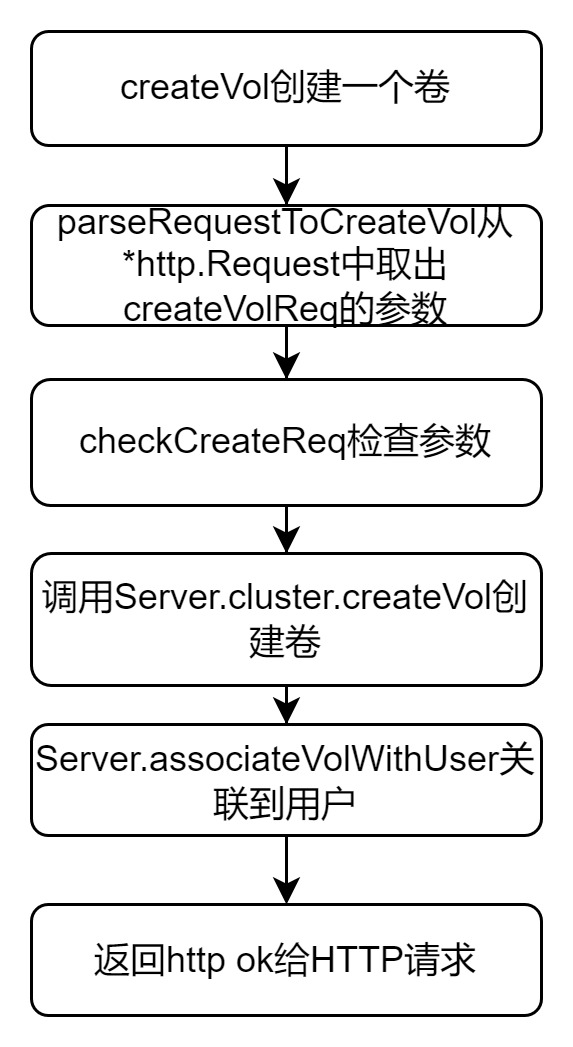
The code flow of the createVol function, which is responsible for creating a volume in the cluster, is relatively simple and clear. Let's take a look at its code flow:
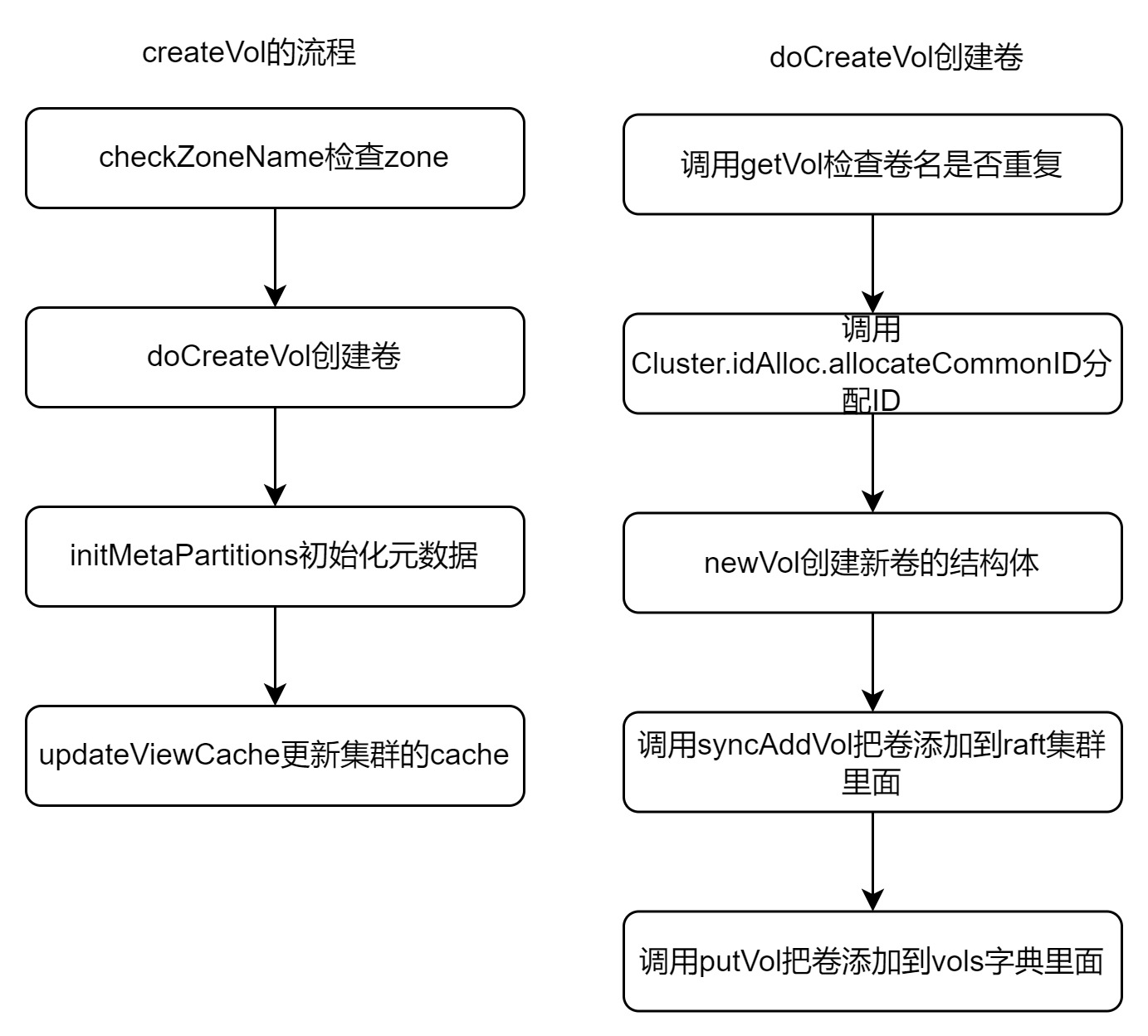
In simple terms, the main steps for creating a volume are as follows: checking the volume name, allocating an ID, adding the new volume to the raft and vols dictionaries, initializing the meta partition, and finally associating it with user accounts.
The operation related to raft in this code is performed in the syncPutVolInfo function, where a command is sent to raft. Essentially, it submits data to the raft log, and ultimately, the record is stored in RocksDB.
Creating Data Partition
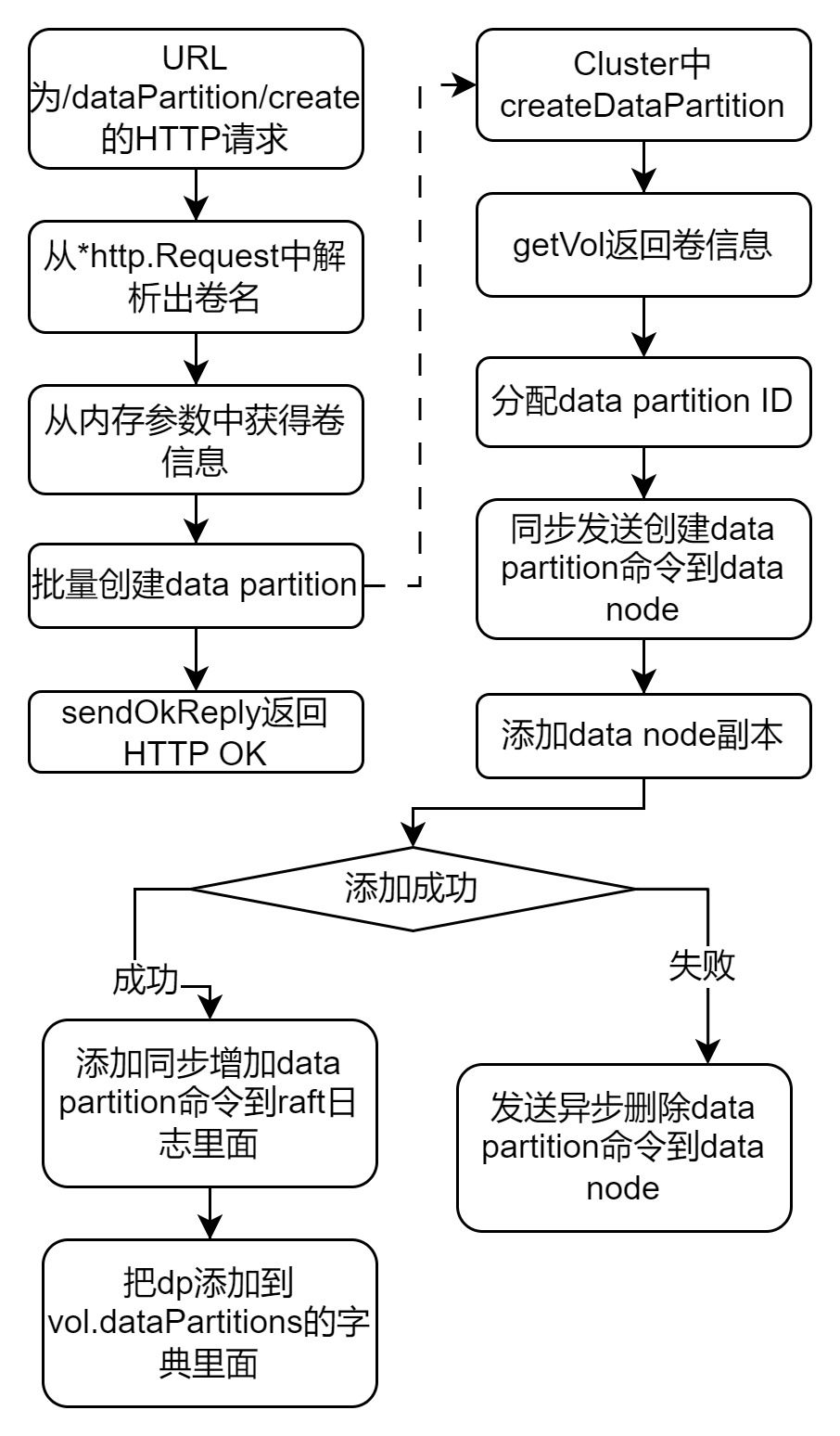
The function for creating a data partition is createDataPartition, located in the file master/cluster.go. Its code flow is as follows:
- Select an available data node.
- Assign the partition ID to the partition.
- Communicate with the node to synchronize the creation of the data partition.
- Once successful, replicate the data through raft and persist it to RocksDB.
Offline Data Partition
The action of offlineing a data partition must be initiated by an administrator.
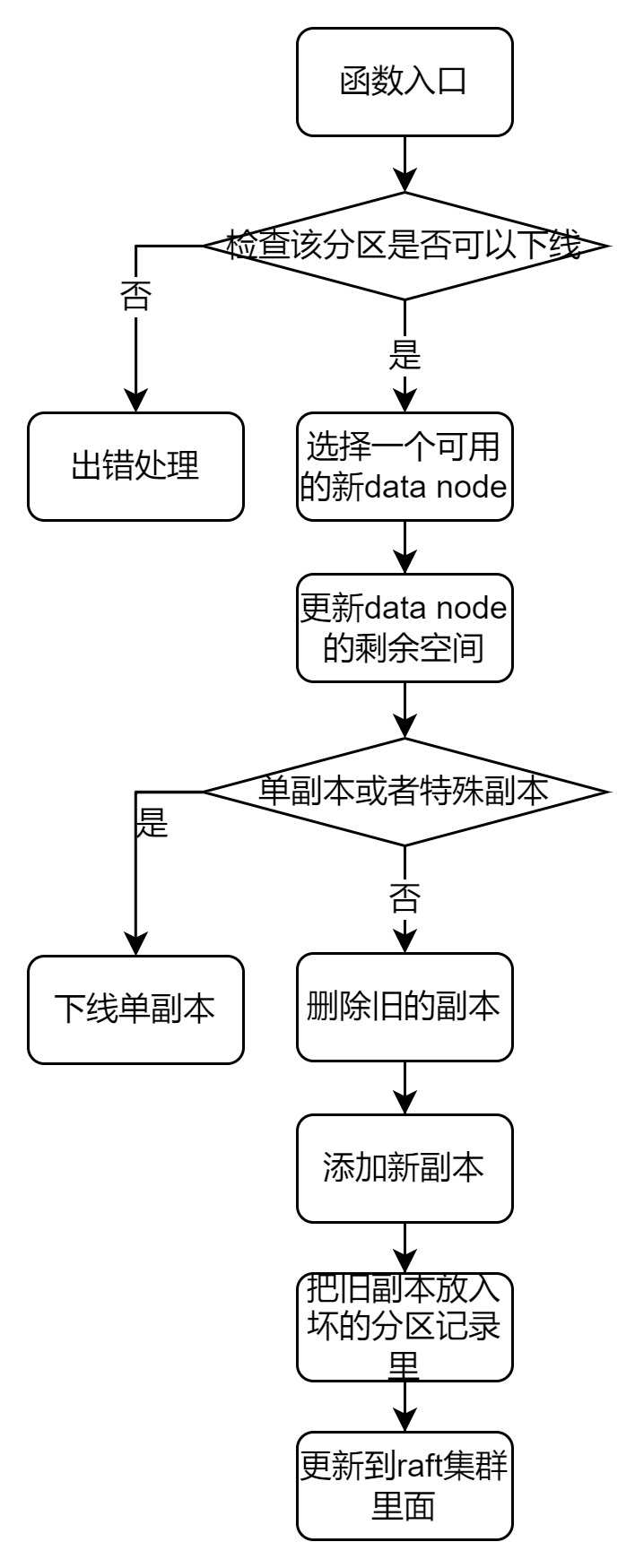
The function responsible for offlineing a data partition is migrateDataPartition, located in the file master/cluster.go.
Before offlineing a partition, the following conditions must be met, otherwise, the offline operation is prohibited:
- Replicas are not in the latest host list.
- There is already an offline replica.
- The remaining replicas are below a threshold.
The entire process of offlineing a data partition through HTTP involves multiple operations. We will only analyze the main function, migrateDataPartition.
The code flow for offlineing a partition is as follows:
- Select a new data node.
- Synchronize the offlineing of the data partition.
- Synchronize the creation of a new data partition.
- Set the old data partition as read-only.
- Persist the updated host list.
Adding Data Replicas
The URL for adding a data replica is /dataReplica/add. The entry function is Server.addDataReplica, and its main implementation is in Cluster.addDataReplica.
The code flow is as follows:
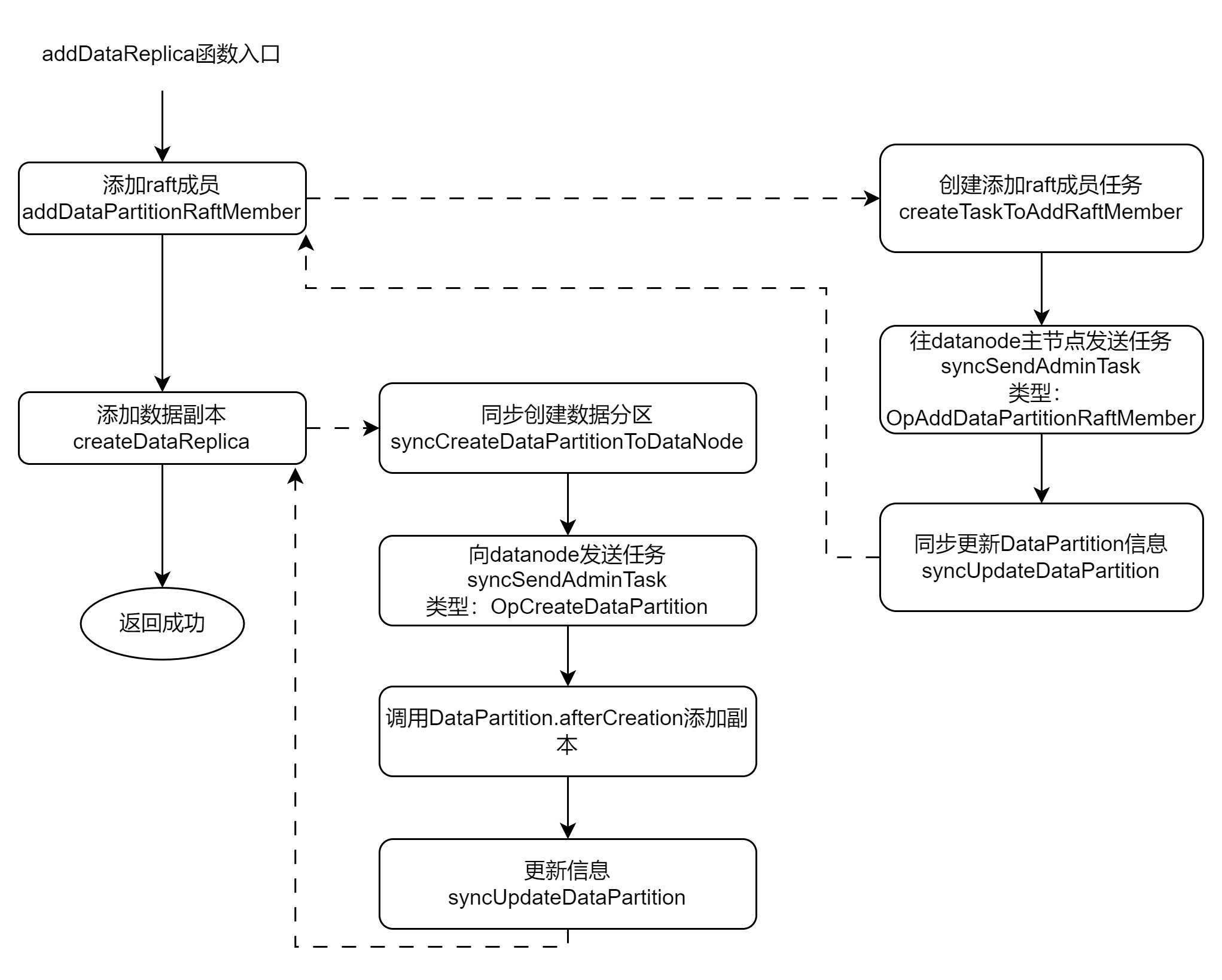
In simple terms, the main operation for adding a replica of a data partition on the master module is to send commands to the data node to create a new raft member and data partition. It then adds the log to the raft cluster and updates the information recorded by the master node.
This logic is also easy to understand: sending a creation command to the data node, adding it to the raft cluster, and persistently storing the configuration information.
Deleting Data Replicas
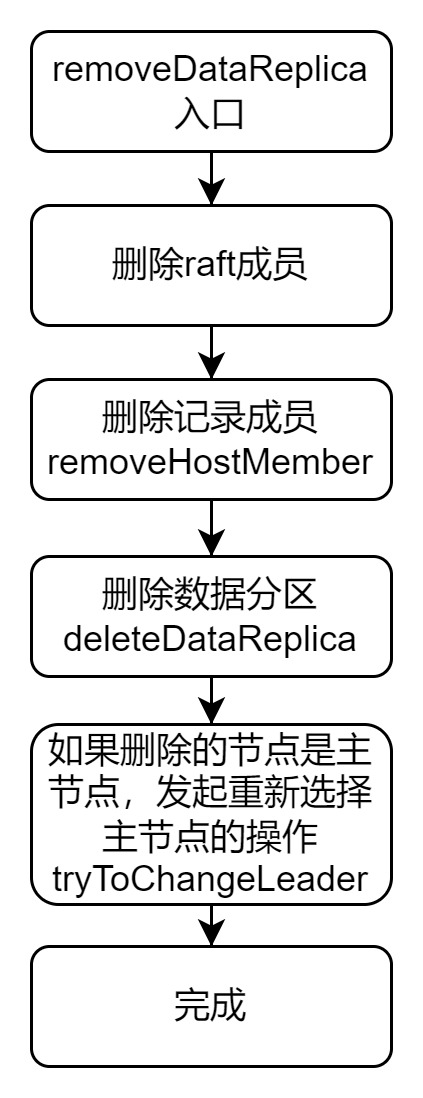
The URL for this HTTP service is /dataReplica/delete. The entry function is deleteDataReplica, and the main function is removeDataReplica.
Adding Data Nodes
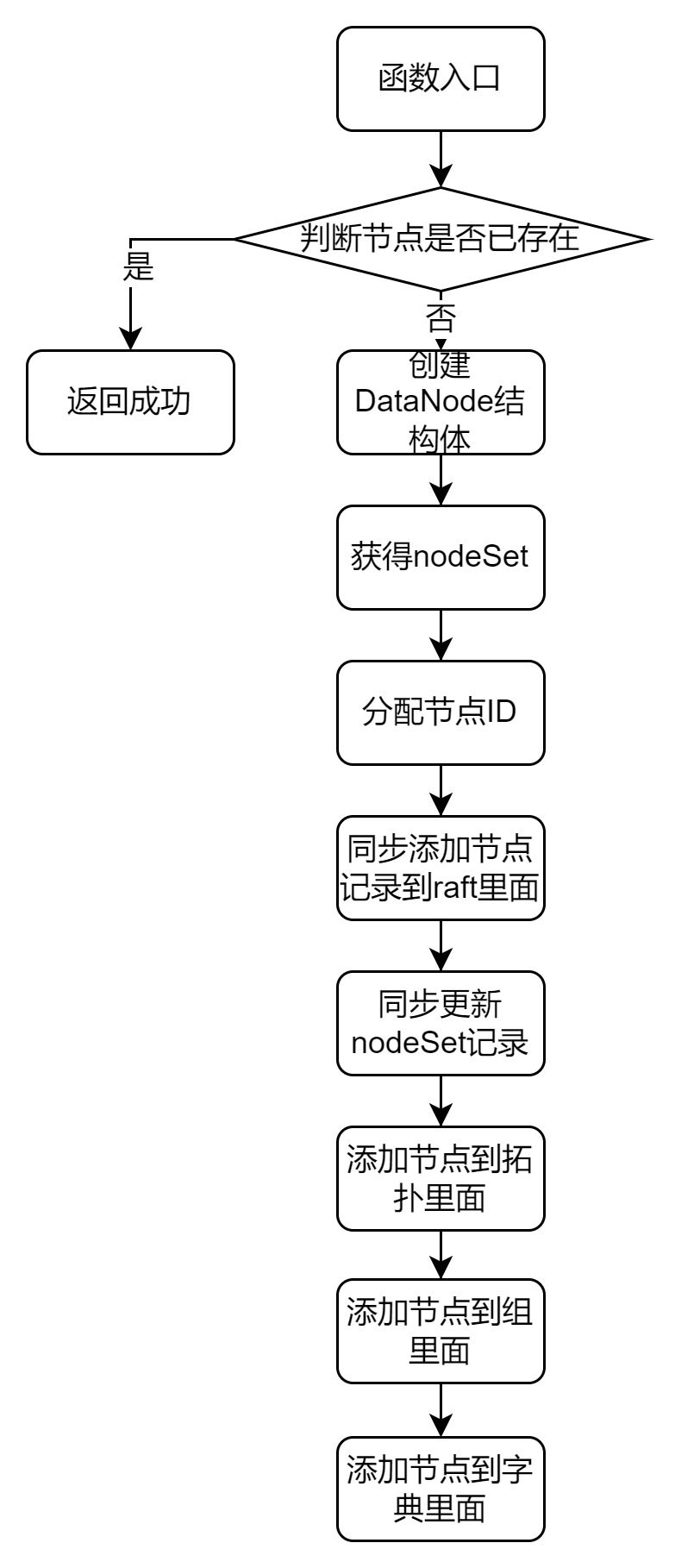
The entry function for adding a data node is addDataNode, and its main code flow is as follows:
- Check if the node address already exists in the dictionary. If it does, return an error.
- Allocate a data node ID.
- Call syncAddDataNode to synchronize the addition of the node.
- Call syncUpdateNodeSet to update the cluster information.
- Call putDataNode to add the node to the topology records.
- Call addNodeSetGrp to add the node to the group.
- Add the node to the dataNode dictionary using the c.dataNodes.Store operation.
Communication Module
The code responsible for communication with metadata/data resides in master/admin_task_manager.go. The AdminTaskManager sends management commands to metaNodes or dataNodes.
This module operates in two modes: synchronous mode and asynchronous mode, where batches of commands are sent every 2 seconds.
Initialization
The function newAdminTaskManager is used to create a communication module. It takes two main parameters: targetAddr and clusterID. targetAddr contains the port address.
Synchronous Mode
The function syncSendAdminTask follows the following flow:
- Call sender.getConn() to obtain a connection from the connection pool. Since useConnPool is true, the connection pool is utilized.
- Call packet.WriteToConn(conn) to send the packet.
- Call packet.ReadFromConn to read the response.
- Call sender.putConn to release the connection. If an error occurs, forceClose is set to true to forcefully release the connection.
Asynchronous Mode
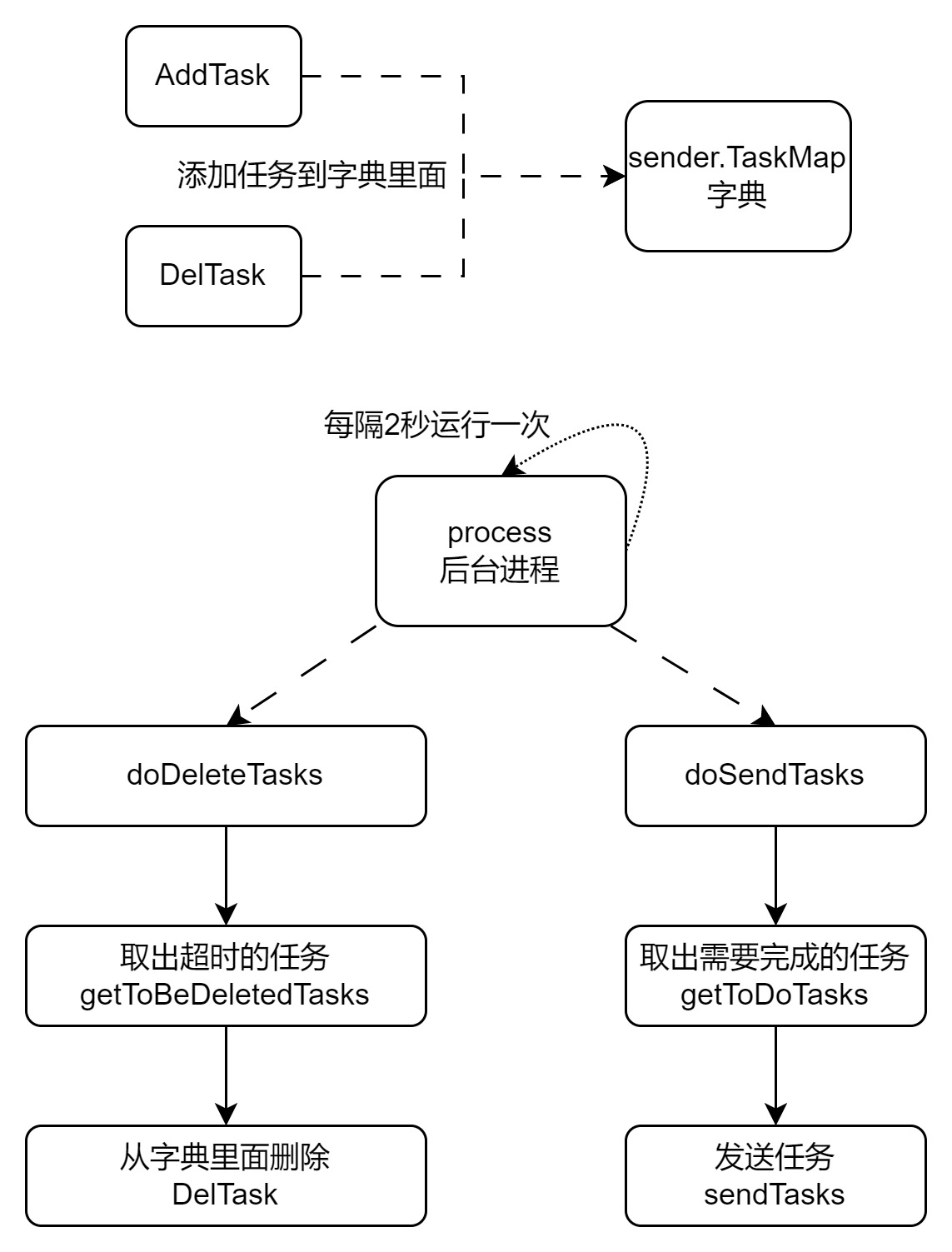
In asynchronous mode, a background process, sender.process(), is started during initialization. This background process periodically calls sender.doDeleteTasks() and sender.doSendTasks() every 2 seconds.
In asynchronous mode, tasks are added to the sender.TaskMap dictionary using AddTask and DelTask. The background process periodically sends these tasks.
The code flow for asynchronous mode is as follows:
Conclusion
In this session, we focused on the code flow of the HTTP service and also briefly discussed the communication mechanisms between the master, metaNode, and dataNode. It can be said that this portion of the code represents the core functionality of the master module.